3. Debian Application
3.1 Serial Terminal

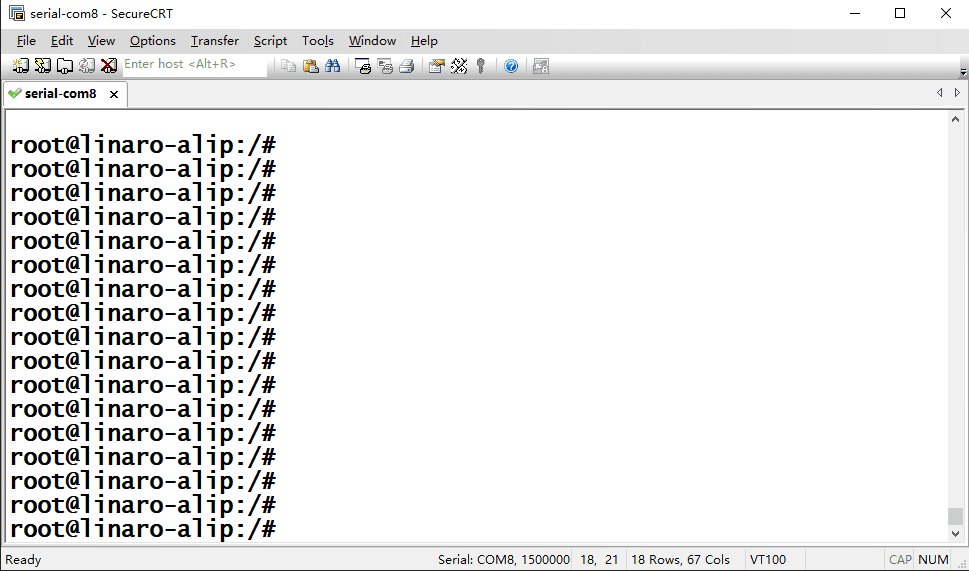
Connect the board and PC with USB Serial cable, then power on, the terminal will output boot information. The default baudrate is 1500000.
3.2 Display(MIPI)
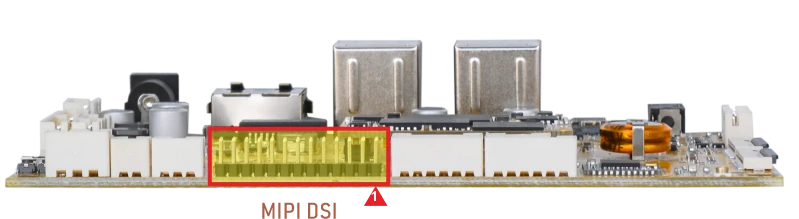
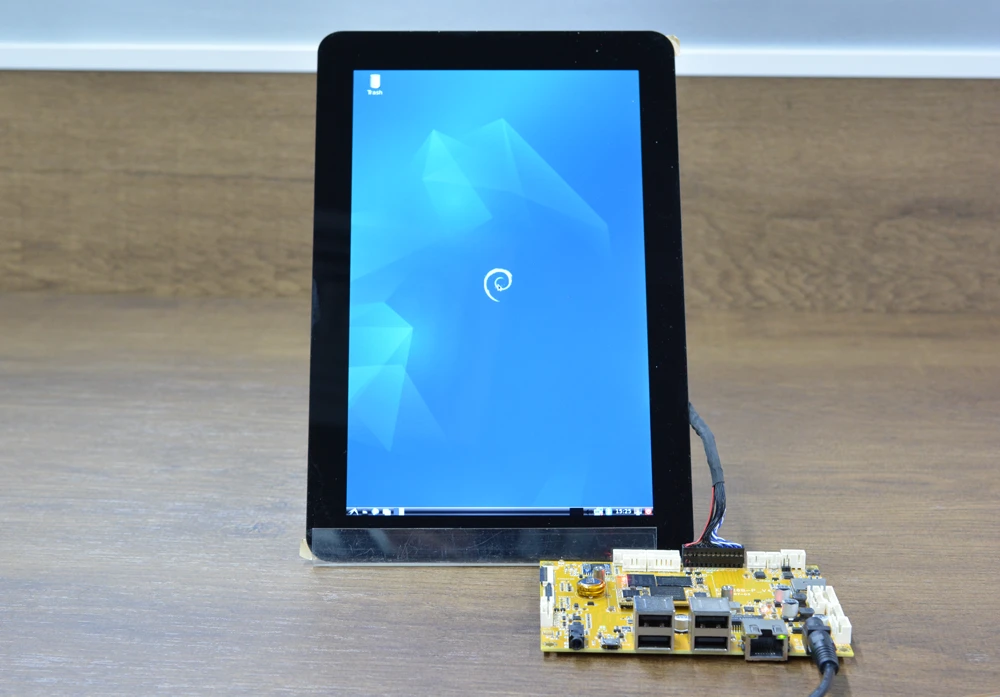
Connect the board and MIPI LCD (default 800×1280 @60Hz), then start up.
3.3 USB
3.3.1 USB Host
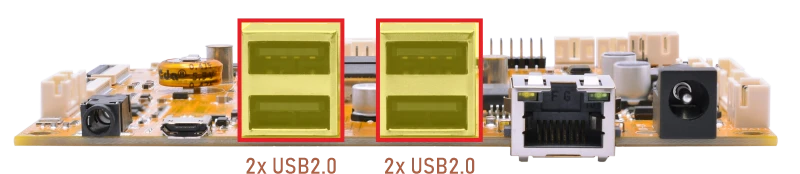
The USB2.0 Host can connect peripherals such as mouse, keyboards, and flash drives.
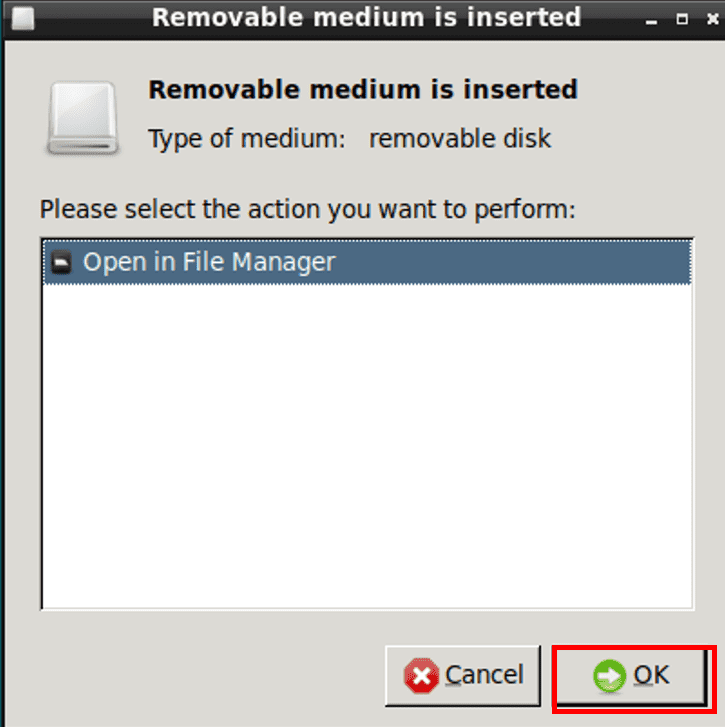
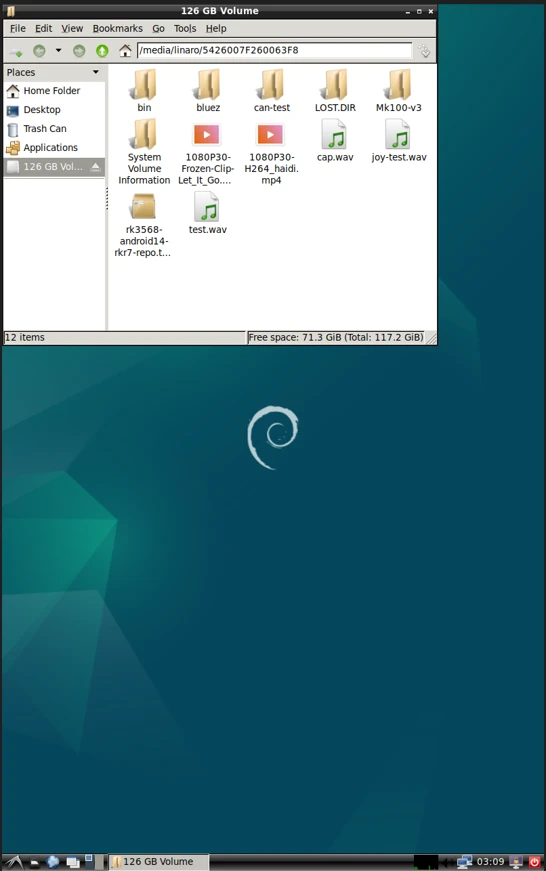
After the USB flash drive is connected, if successfully recognized, an icon appears on the desktop for accessing the files.
3.3.2 USB OTG
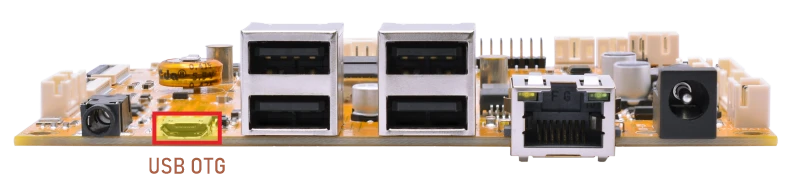
By default, the OTG port operates in Device mode, allowing ADB connections for debugging.
To enable ADB on a Windows PC, please follow the steps below.
❶ Connect the board and PC host with Micro USB cable.
❷ Install ADB driver on Windows system.
❸ Press Windows+R, type cmd, and press Enter to open the command prompt.
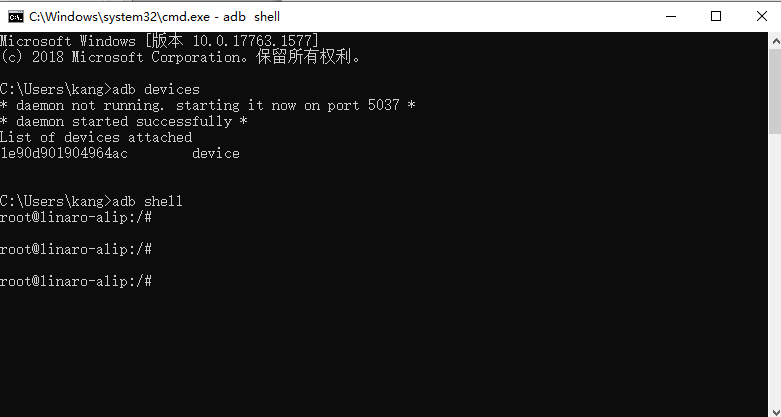
❹ Run the following command to check ADB connection.
1adb shell
3.4 Ethernet
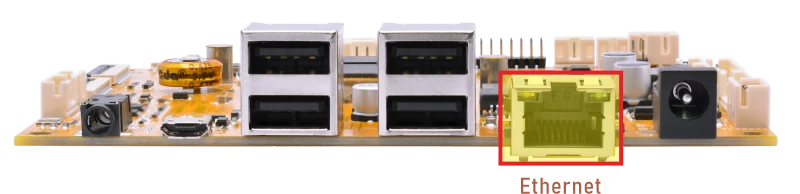
❶ Connect the board to the router via Ethernet; DHCP is enabled for auto-IP.
root@linaro-alip:/#
[  397.838650] rk_gmac-dwmac 21c70000.ethernet eth0: Link is Up - 1Gbps/Full - flow control rx/tx
[  397.838728] IPv6: ADDRCONF(NETDEV_CHANGE): eth0: link becomes ready
❷ View the status of the network interface.
1ifconfig
root@linaro-alip:/# ifconfig
eth0      Link encap:Ethernet  HWaddr FA:B2:1C:0E:F2:D4
          inet addr:193.168.0.124  Bcast:193.168.0.255  Mask:255.255.255.0
          inet6 addr: fe80::8f56:d77d:6c3a:38a2/64 Scope:Link
          UP BROADCAST RUNNING MULTICAST  MTU:1500  Metric:1
          RX packets:85 errors:0 dropped:16 overruns:0 frame:0
          TX packets:11 errors:0 dropped:0 overruns:0 carrier:0
          collisions:0 txqueuelen:1000
          RX bytes:7960 (7.7 KiB)  TX bytes:1410 (1.3 KiB)
         Interrupt:74
❸ Ping URL/IP at terminal to test Network.
1ping -I eth0 www.armdesigner.com
root@linaro-alip:/# ping -I eth0 www.armdesigner.com
PING www.armdesigner.com (3.174.46.90) from 193.168.0.124 eth0: 56(84) bytes of data.
64 bytes from www.armdesigner.com (3.174.46.90): icmp_seq=1 ttl=50 time=196 ms
64 bytes from www.armdesigner.com (3.174.46.90): icmp_seq=2 ttl=50 time=191 ms
64 bytes from www.armdesigner.com (3.174.46.90): icmp_seq=3 ttl=50 time=194 ms
64 bytes from www.armdesigner.com (3.174.46.90): icmp_seq=4 ttl=50 time=193 ms
64 bytes from www.armdesigner.com (3.174.46.90): icmp_seq=5 ttl=50 time=191 ms
64 bytes from www.armdesigner.com (3.174.46.90): icmp_seq=6 ttl=50 time=194 ms
64 bytes from www.armdesigner.com (3.174.46.90): icmp_seq=7 ttl=50 time=191 ms
^C
--- www.armdesigner.com ping statistics ---
7 packets transmitted, 7 received, 0% packet loss, time 6008ms
rtt min/avg/max/mdev = 190.700/193.683/195.603/1.853 ms
3.5 SD Card
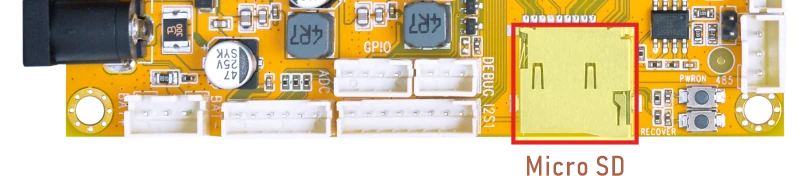
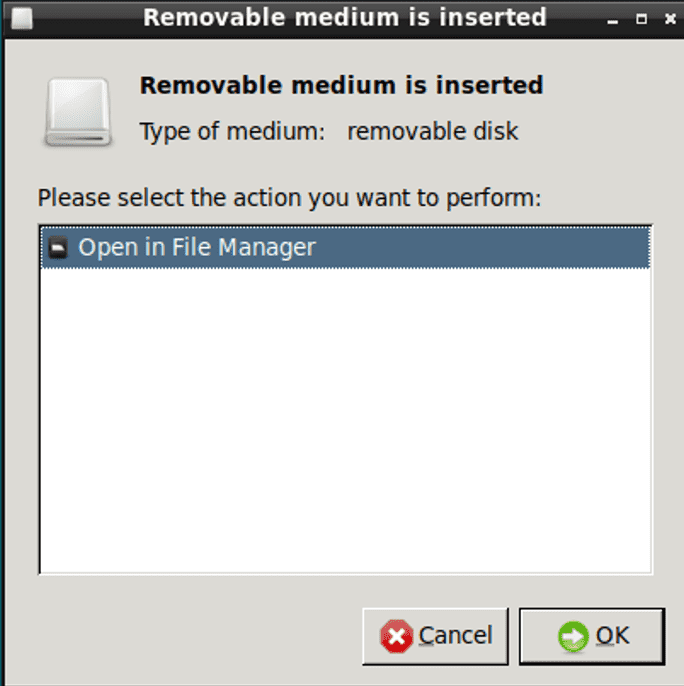
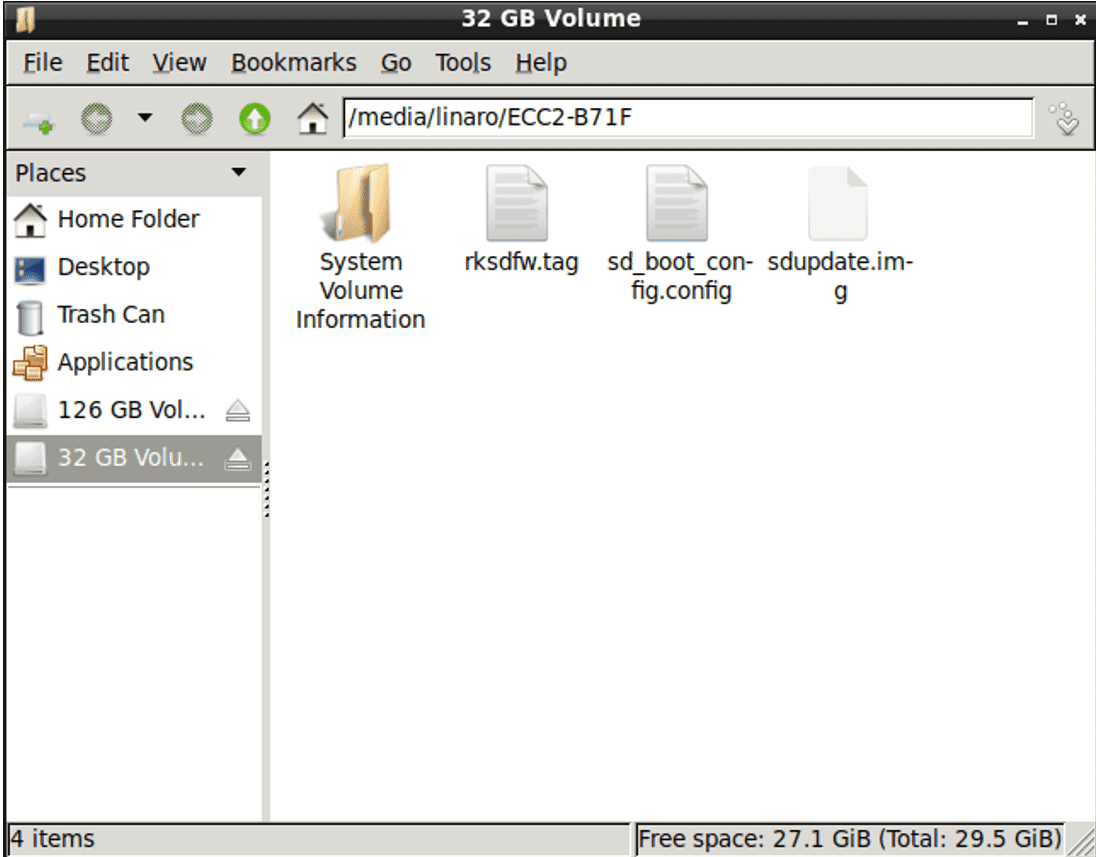
After inserting the SD Card, an icon will appear on the desktop. Click OK to access the SD card.
3.6 WiFi & Bluetooth
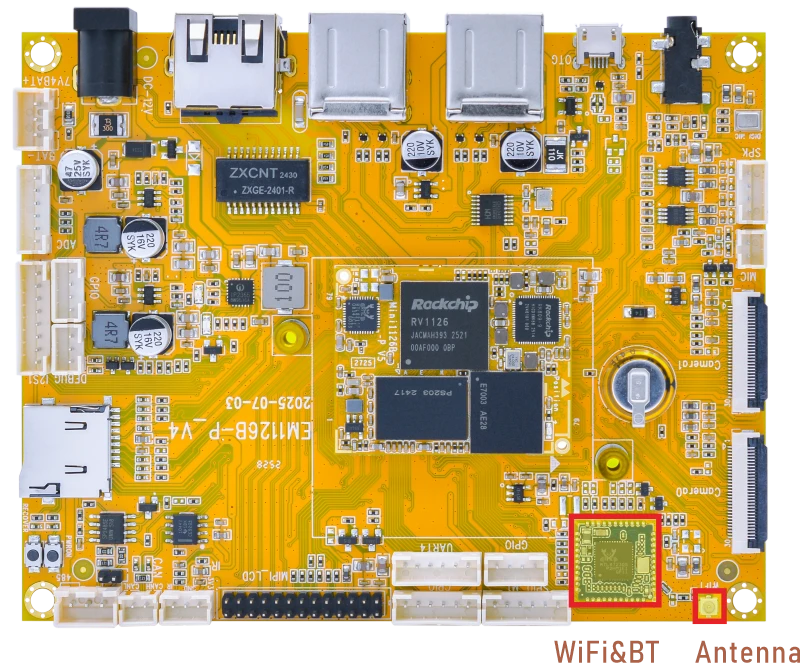
3.6.1 WiFi
❶ Connect the WiFi antenna.
❷ Click the network icon in the bottom right corner of the UI interface.
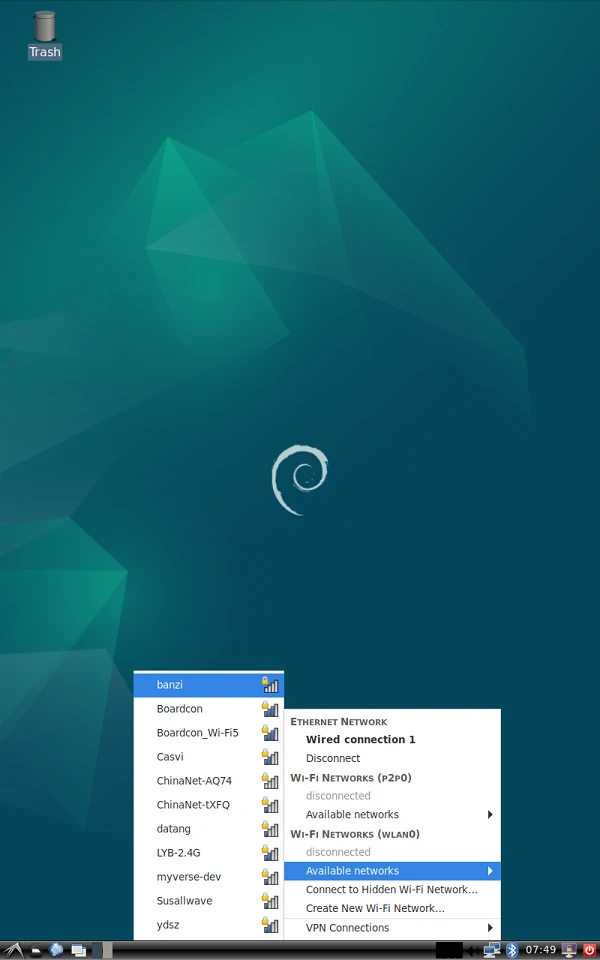
❸ Select the SSID from the list of available networks and enter the password.
❹ After connected, user can open Browser or ping URL/IP at terminal to test network.
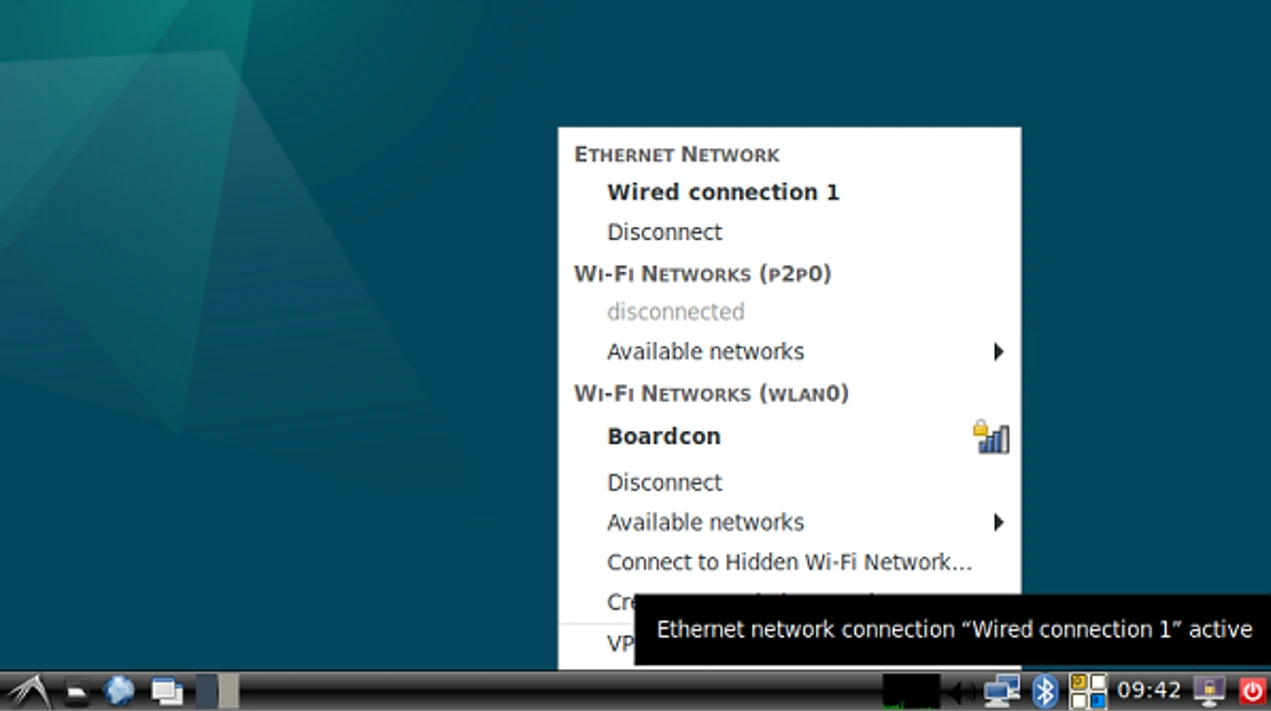
1ifconfig
2ping -I wlan0 www.armdesigner.com
3.6.2 Bluetooth
❶ Click the Bluetooth icon in the bottom right corner of the UI interface.
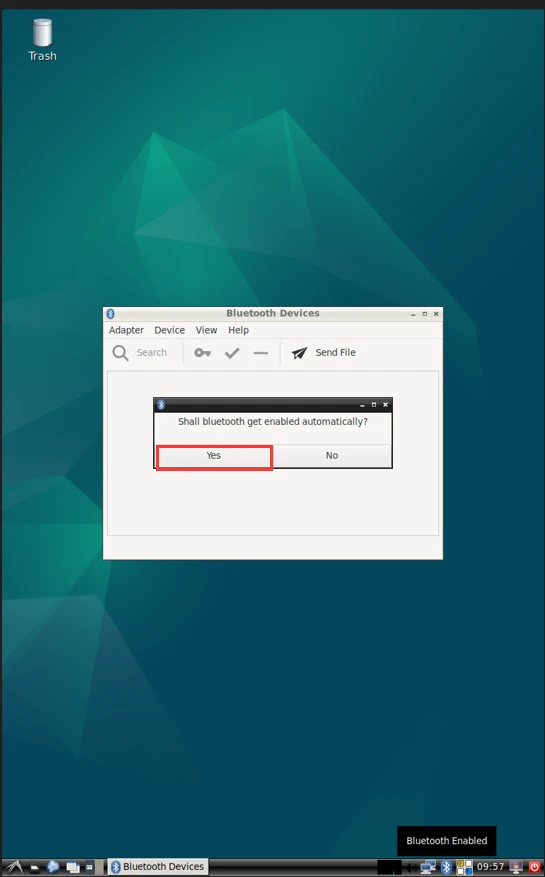
❷ The Bluetooth device name is hidden by default. Set the Bluetooth device name to be visible. Click Adapter -> Preferences -> Always visible
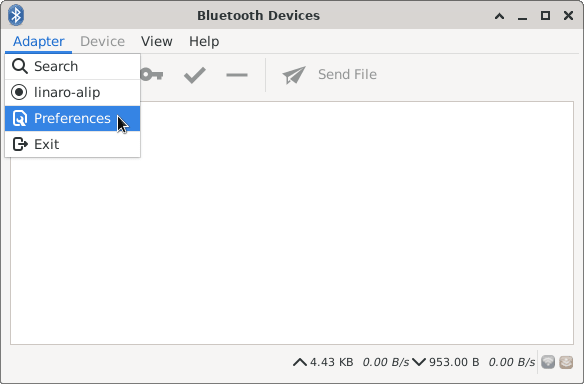
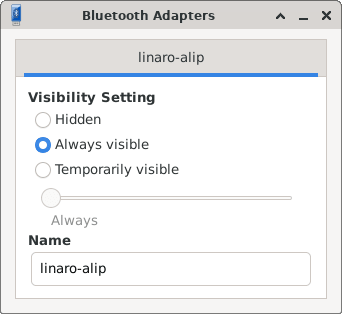
❸ Click Search to start searching and select the available device in the list to pair.
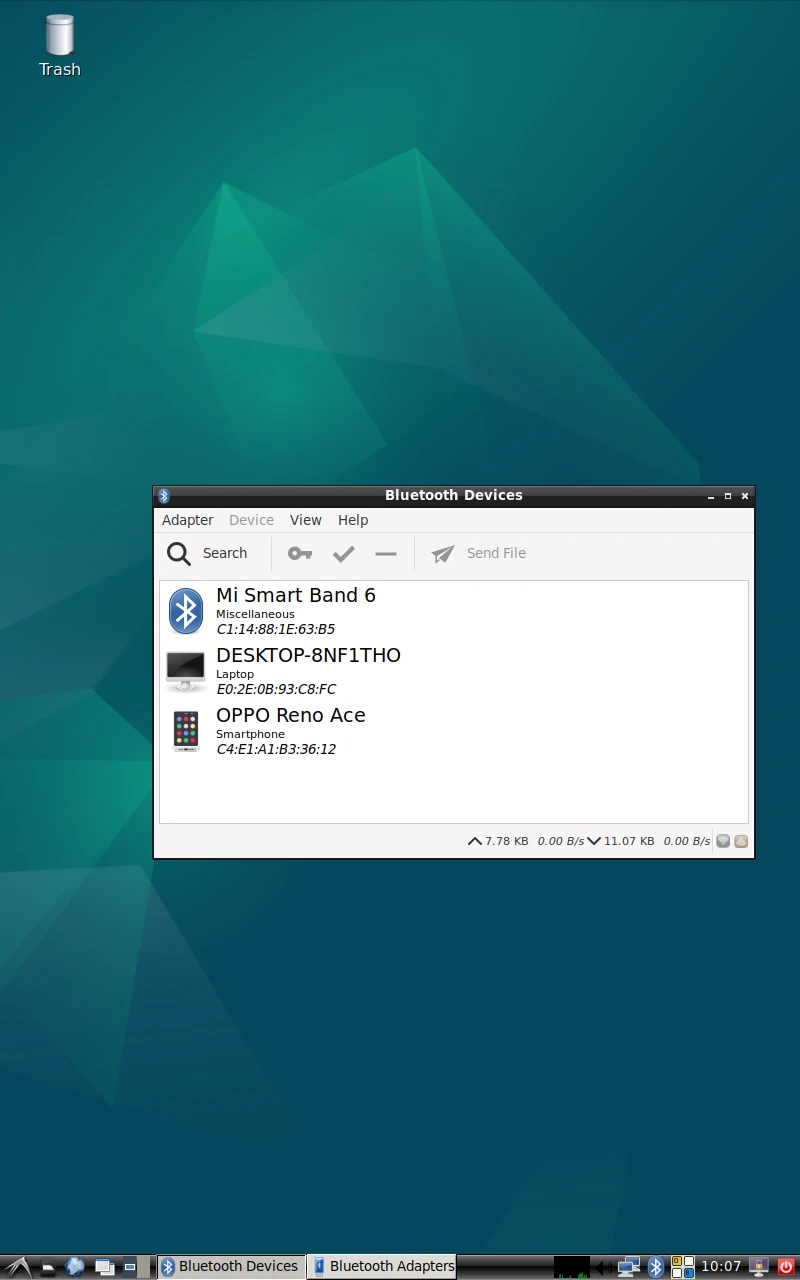
After pairing, devices can connect with each other automatically.
3.7 Audio
3.7.1 Audio Input
1cat /proc/asound/cards //view sound card
root@linaro-alip:/# cat /proc/asound/cards
 0 [rockchiprk809co]: simple-card - rockchip,rk809-codec
                      rockchip,rk809-codec
 1 [rockchippdmmica]: simple-card - rockchip,pdm-mic-array
                     rockchip,pdm-mic-array
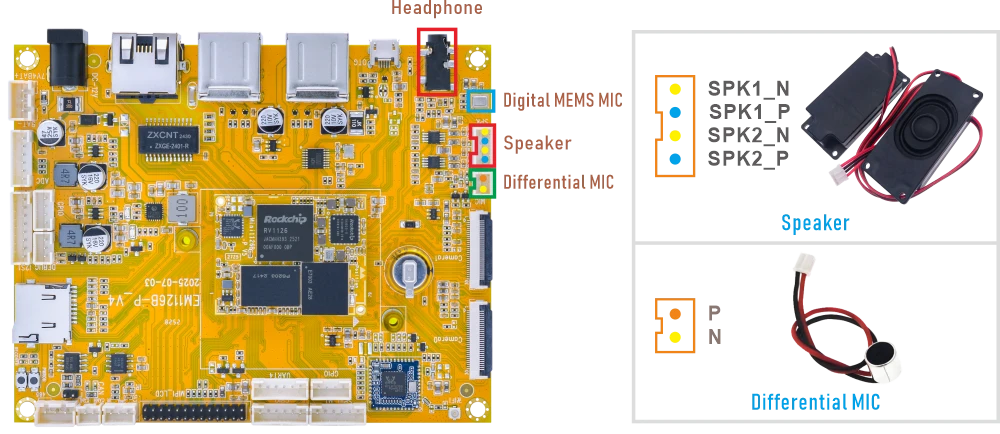
❶ Connect the MIC to the connector (2-pin/2.0mm pitch).
❷ Execute the commands.
1amixer -c 0 cset numid=38 1
2arecord -Dhw:0,0 -f cd -t wav test.wav
Serial terminal outputroot@linaro-alip:/# amixer -c 0 cset numid=38 1 numid=38,iface=MIXER,name='Capture MIC Path' ; type=ENUMERATED,access=rw------,values=1,items=4 ; Item #0 'MIC OFF' ; Item #1 'Main Mic' ; Item #2 'Hands Free Mic' ; Item #3 'BT Sco Mic' : values=1 root@rv1126b-buildroot:/# arecord -Dhw:0,0 -f cd -t wav test.wav Recording WAVE 'test.wav' : Signed 16 bit Little Endian, Rate 44100 Hz, Stereo
1arecord -D hw:1,0 -f s16_le -c 2 -r 16000 cap.wav
root@linaro-alip:/# arecord -D hw:1,0 -f s16_le -c 2 -r 16000 cap.wav
Recording WAVE 'cap.wav' : Signed 16 bit Little Endian, Rate 16000 Hz, Stereo
3.7.2 Audio Output
❶ Plug the headphone into the 3.5mm Audio jack.
❷ Execute the commands.
1amixer -c 0 cset numid=37 3
root@linaro-alip:/# amixer -c 0 cset numid=37 3
numid=37,iface=MIXER,name='Playback Path'
 ; type=ENUMERATED,access=rw------,values=1,items=11
 ; Item #0 'OFF'
 ; Item #1 'RCV'
 ; Item #2 'SPK'
 ; Item #3 'HP'
 ; Item #4 'HP_NO_MIC'
 ; Item #5 'BT'
 ; Item #6 'SPK_HP'
 ; Item #7 'RING_SPK'
 ; Item #8 'RING_HP'
 ; Item #9 'RING_HP_NO_MIC'
 ; Item #10 'RING_SPK_HP'
 : values=3
❶ Connect the Speaker to the connector (4-pin/2.0mm pitch).
❷ Execute the commands.
1amixer -c 0 cset numid=37 2
root@linaro-alip:/# amixer -c 0 cset numid=37 2
numid=37,iface=MIXER,name='Playback Path'
 ; type=ENUMERATED,access=rw------,values=1,items=11
 ; Item #0 'OFF'
 ; Item #1 'RCV'
 ; Item #2 'SPK'
 ; Item #3 'HP'
 ; Item #4 'HP_NO_MIC'
 ; Item #5 'BT'
 ; Item #6 'SPK_HP'
 ; Item #7 'RING_SPK'
 ; Item #8 'RING_HP'
 ; Item #9 'RING_HP_NO_MIC'
 ; Item #10 'RING_SPK_HP'
 : values=2
3.8 IR
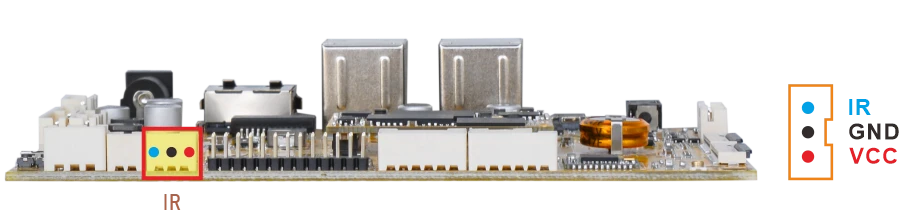
❶ Connect the IR receiver.
❷ Open IR debugging print.
1echo 1 > /sys/module/rockchip_pwm_remotectl/parameters/code_print
❸ Press remote button, key value printed to log.
root@linaro-alip:/# echo 1 > /sys/module/rockchip_pwm_remotectl/parameters/code_print
[  293.297790] USERCODE=0x1818
[  293.325015] RMC_GETDATA=9a
[  293.217858] USERCODE=0x1818
[  293.244995] RMC_GETDATA=99
[  293.837300] USERCODE=0x1818
[  293.864505] RMC_GETDATA=98
[  295.241483] USERCODE=0x1818
[  295.268684] RMC_GETDATA=9b
3.9 RS485
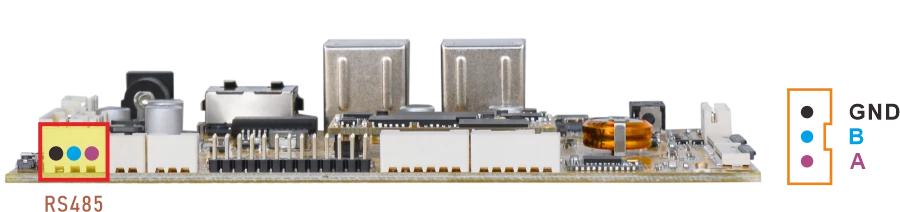
❶ Connect PC and board with USB-to-RS485 adapter.
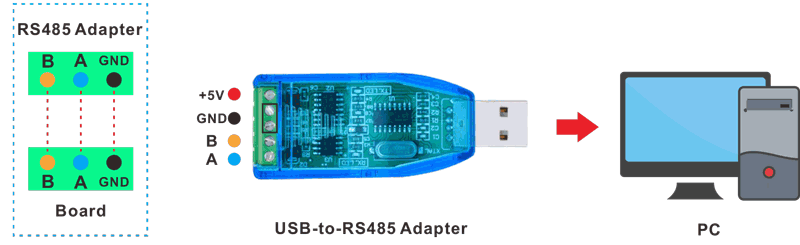
RS485 connection
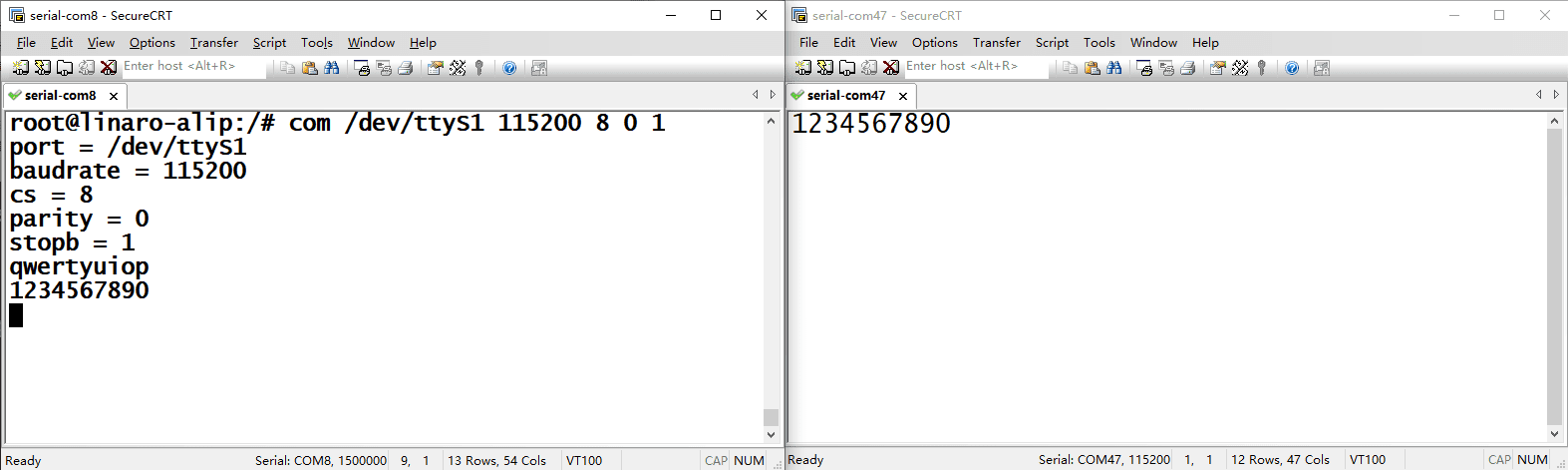
❷ Open the Serial Terminal and set baud rate for the board and RS485 adapter respectively.
Baud rate: board - 1500000; RS485 adapter - 115200
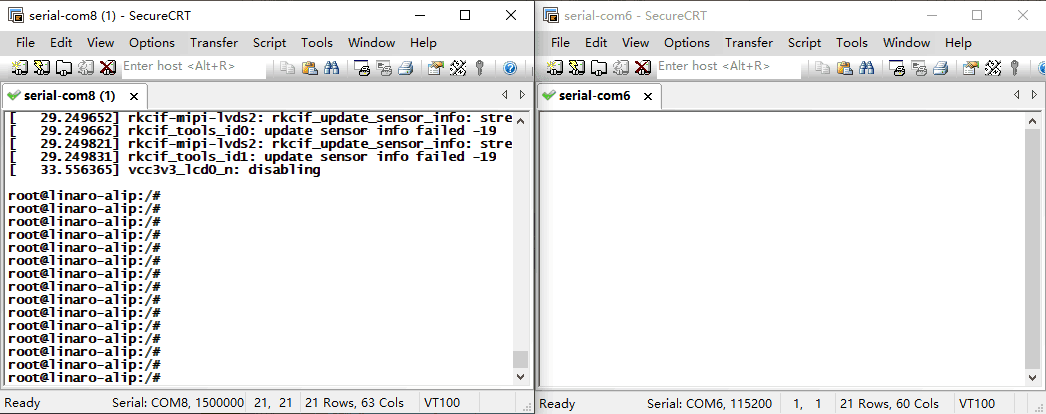
❸ Execute command on the terminal serial port of board.
1com /dev/ttyS1 115200 8 0 1
❹ Input character to test RS485 communication.
3.10 UART
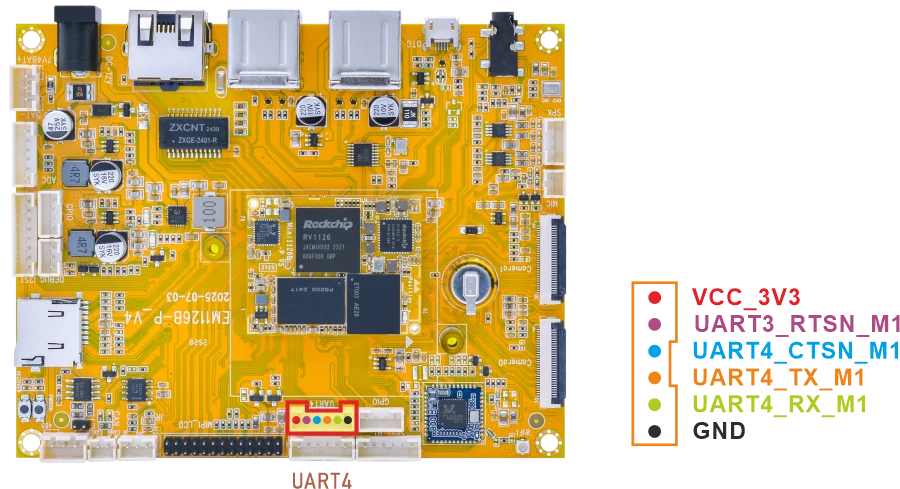
❶ Connect RX and TX of UART3.
❷ Execute command and input character to test.
1com /dev/ttyS4 115200 8 0 1
root@linaro-alip:/# com /dev/ttyS4 115200 8 0 1
port = /dev/ttyS4
baudrate = 115200
cs = 8
parity = 0
stopb = 1
12345678
RECV: 12345678
abcdefg
RECV: abcdefg
3.11 CAN
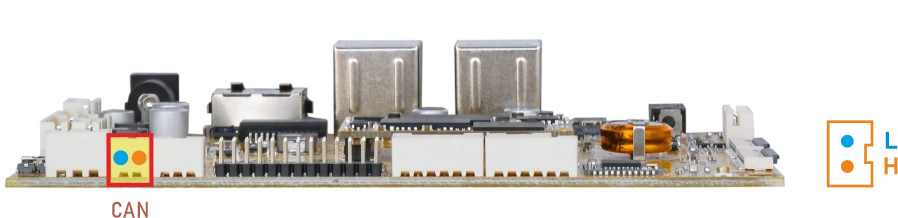
❶ Connect PC and board with USB-to-CAN adapter.
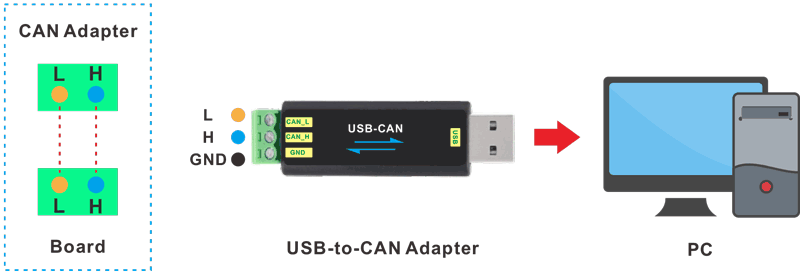
CAN connection
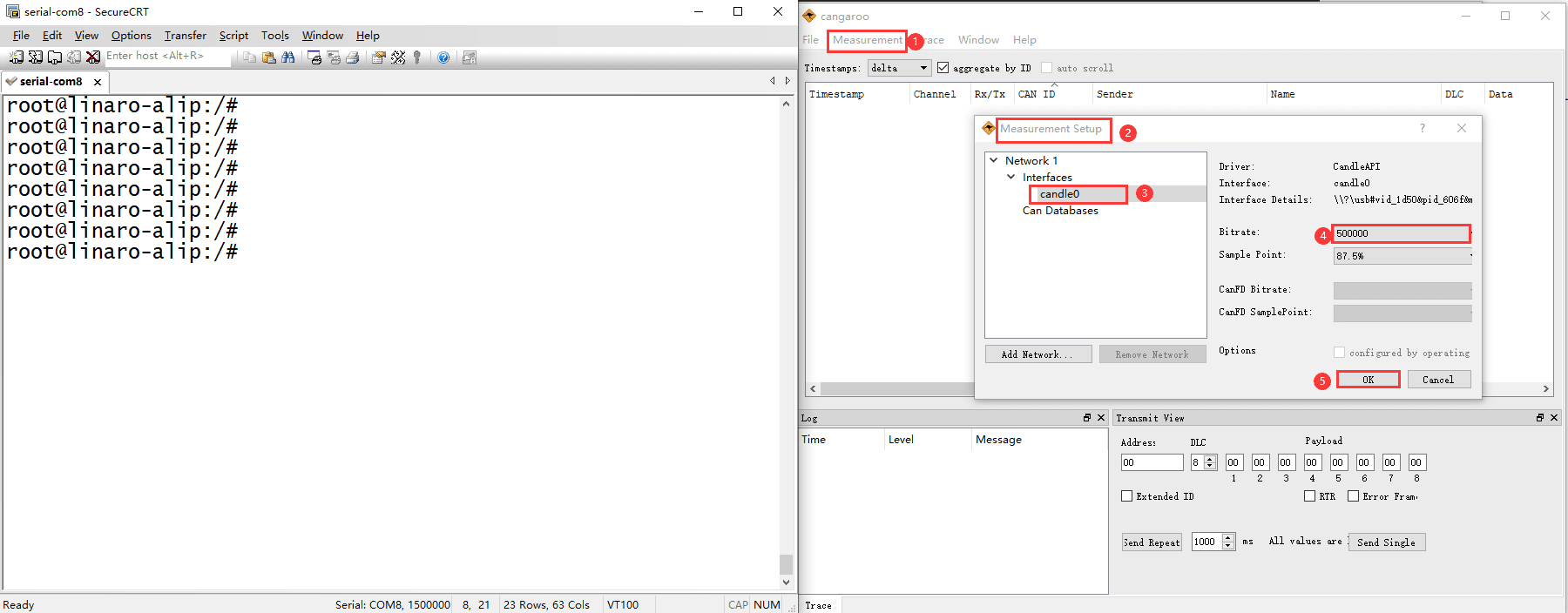
❷ Open the CAN application and set the baudrate to 500000 on PC.
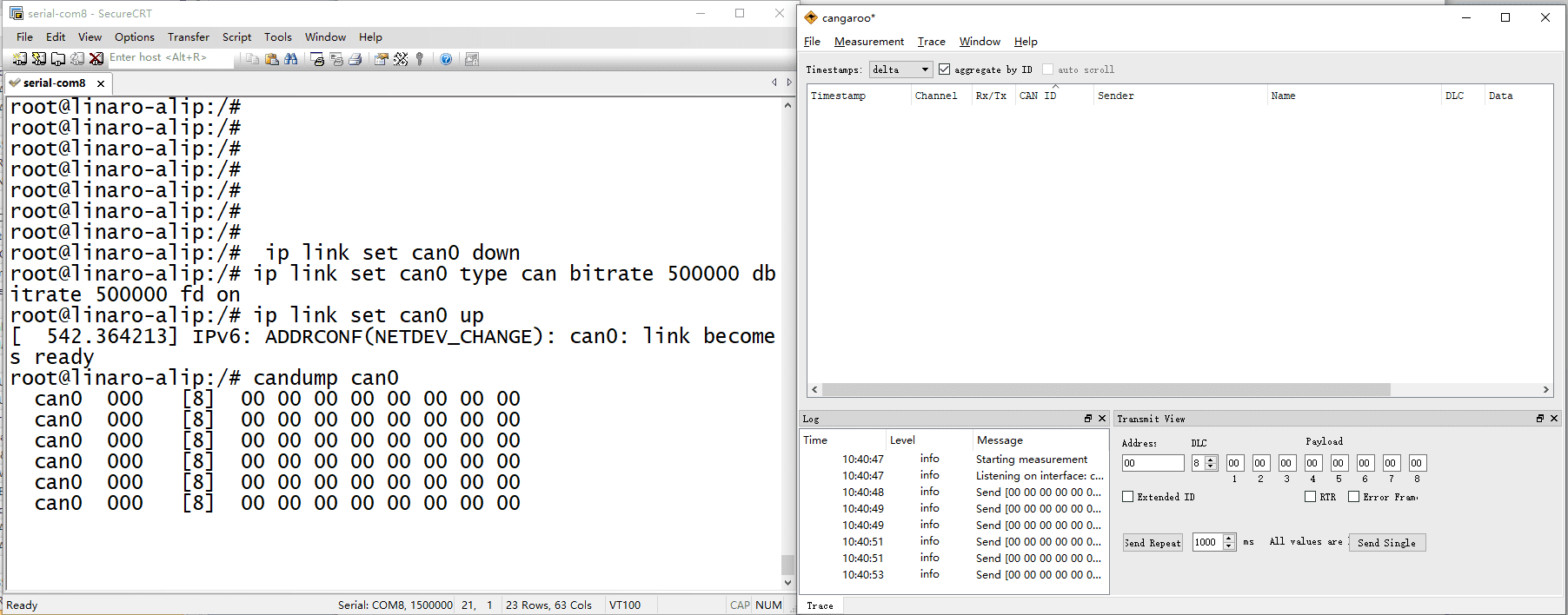
❸ Execute commands on Serial Terminal to configure and start the CAN network.
1ip link set can0 down
2ip link set can0 type can bitrate 500000 dbitrate 500000 fd on
3ip link set can0 up
❹ Configure CAN as receiver.
1candump can0
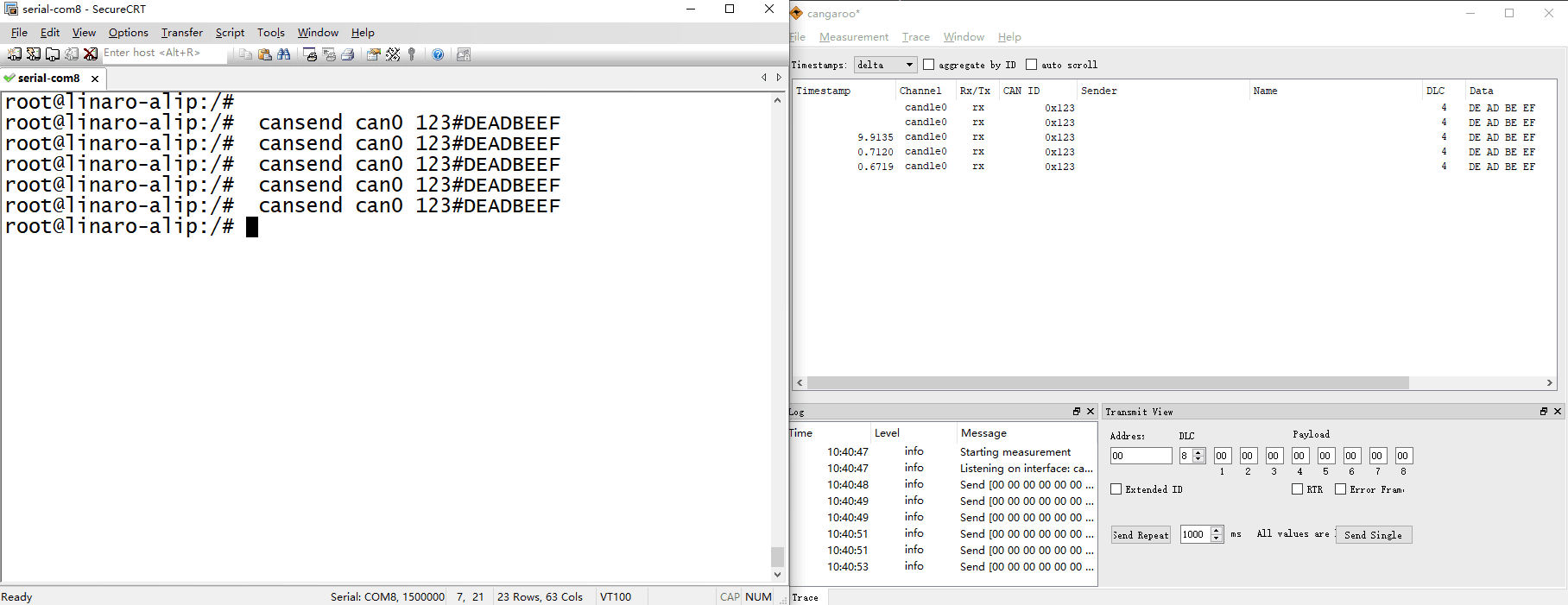
❺ Set CAN as Transmitter.
1cansend can0 123#DEADBEEF
3.12 SPI
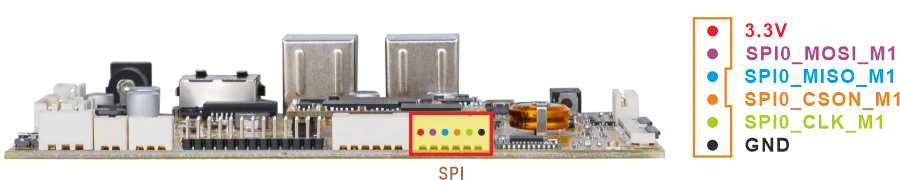
❶ Connect MOSI and MISO of SPI.
❷ Execute command to test.
1spidev-test
root@linaro-alip:/# spidev-test
spi mode: 0
bits per word: 8
max speed: 10000000 Hz (10000 KHz)

EE FF FF FF FF FF
40 00 00 00 00 95
FF FF FF FF FF FF
FF FF FF FF FF FF
FF FF FF FF FF FF
DE AD BE EF BA AD
F0 0D
3.13 ADC
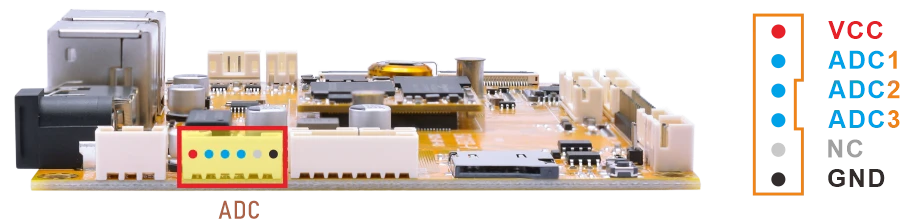
Connect the ADC pin to two different voltage levels within 0~1.8V respectively. For each level, after setting the pin to that level, execute the test command.
1cat /sys/bus/iio/devices/iio:\device0/in_voltage1_raw //test ADC1
root@linaro-alip:/# cat /sys/bus/iio/devices/iio:\device0/in_voltage1_raw
42
root@linaro-alip:/# cat /sys/bus/iio/devices/iio:\device0/in_voltage1_raw
8191
1cat /sys/bus/iio/devices/iio:\device0/in_voltage2_raw //test ADC2
1cat /sys/bus/iio/devices/iio:\device0/in_voltage3_raw //test ADC3
3.14 Battery Supply
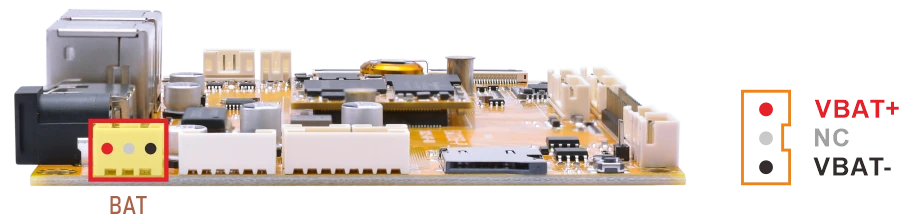
❶ Connect the 7.4V Li-ion battery to the BAT connector.
❷ Execute the command to check the current voltage.
1cat /sys/class/power_supply/battery/voltage_now
3.15 GPIO
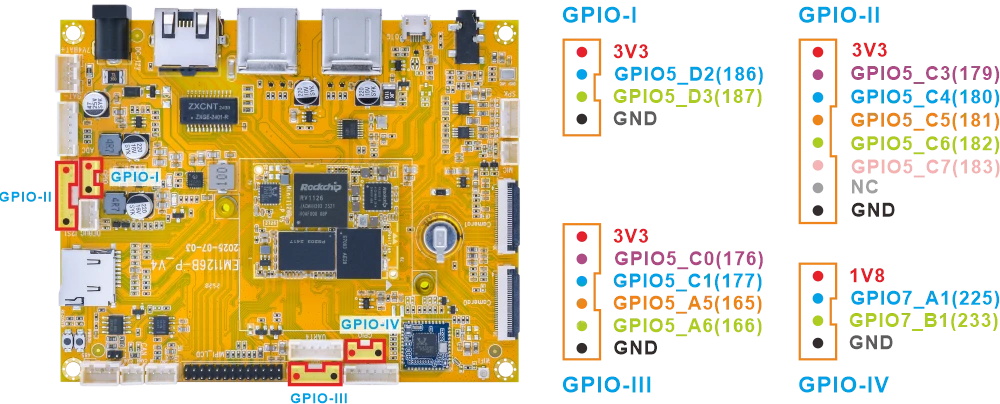
# Export the GPIO and set it as output
gpio_ctrl.sh x export

# Set output to high level
gpio_ctrl.sh x set 1

# Read the current GPIO level
gpio_ctrl.sh x get

# Set output to low level (should be 1)
gpio_ctrl.sh x set 0

# Read the GPIO level again (should be 0)
gpio_ctrl.sh x get

# Unexport GPIO
gpio_ctrl.sh x unexport
Test GPIO-186 for example.
1gpio_ctrl.sh 186 export
2gpio_ctrl.sh 186 set 1
3gpio_ctrl.sh 186 get
4gpio_ctrl.sh 186 set 0
5gpio_ctrl.sh 186 get
6gpio_ctrl.sh 186 unexport
root@linaro-alip:/# gpio_ctrl.sh 186 export
GPIO186 exported as out
root@linaro-alip:/# gpio_ctrl.sh 186 set 1
GPIO186 set to 1
root@linaro-alip:/# gpio_ctrl.sh 186 get
GPIO186 value: 1
root@linaro-alip:/# gpio_ctrl.sh 186 set 0
GPIO186 set to 0
root@linaro-alip:/# gpio_ctrl.sh 186 get
GPIO186 value: 0
root@linaro-alip:/# gpio_ctrl.sh 186 unexport
GPIO186 unexported
3.16 Camera
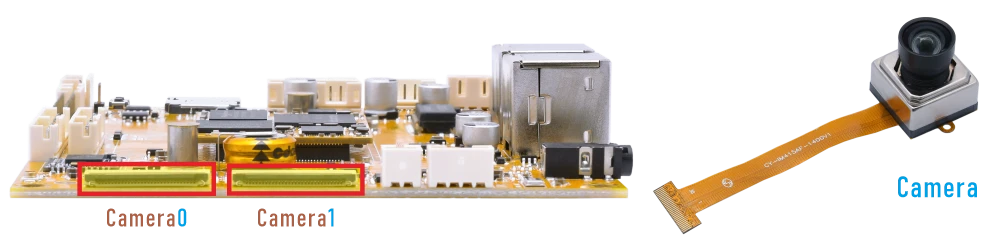
❶ Connect the camera to the board and power on.
❷ Execute command to preview camera0.
1./rockchip-test/camera/boardcon-camera0-test.sh
root@linaro-alip:/# ./rockchip-test/camera/boardcon-camera0-test.sh
[  469.662329] dw9714 1-000c: cmd 0x80685600 not supported
[  469.662978] dw9714 3-000c: cmd 0x80685600 not supported
Setting pipeline to PAUSED ...
Using mplane plugin for capture
Pipeline is live and does not need PREROLL ...
/GstPipeline:pipeline0/GstKMSSink:kmssink0: display-width = 800
/GstPipeline:pipeline0/GstKMSSink:kmssink0: display-height = 1280
Pipeline is PREROLLED ...
Setting pipeline to PLAYING ...
/GstPipeline:pipeline0/GstV4l2Src:v4l2src0: crop-bounds = < (int)0, (int)0, (int)3840, (int)2160 >
New clock: GstSystemClock
/GstPipeline:pipeline0/GstV4l2Src:v4l2src0.GstPad:src: caps = video/x-raw, format=(string)NV12, width=(int)1920, height=(int)1080, framerate=(fraction)30/1, interlace-mode=(string)progressive, colorimetry=(string)1:3:5:1
/GstPipeline:pipeline0/GstCapsFilter:capsfilter0.GstPad:src: caps = video/x-raw, format=(string)NV12, width=(int)1920, height=(int)1080, framerate=(fraction)30/1, interlace-mode=(string)progressive, colorimetry=(string)1:3:5:1
/GstPipeline:pipeline0/GstKMSSink:kmssink0.GstPad:sink: caps = video/x-raw, format=(string)NV12, width=(int)1920, height=(int)1080, framerate=(fraction)30/1, interlace-mode=(string)progressive, colorimetry=(string)1:3:5:1
[  469.711515] rkisp_hw 21d00000.isp: set isp clk = 500000000Hz
/GstPipeline:pipeline0/GstCapsFilter:capsfilter0.GstPad:sink: caps = video/x-raw, format=(string)NV12, width=(int)1920, height=(int)1080, framerate=(fraction)30/1, interlace-mode=(string)progressive, colorimetry=(string)1:3:5:1
[  469.721459] rkcif-mipi-lvds: stream[0] start streaming
[  469.721845] rockchip-mipi-csi2 mipi0-csi2: stream on, src_sd: 00000000791e80fd, sd_name:rockchip-csi2-dphy0
[  469.721875] rockchip-mipi-csi2 mipi0-csi2: stream ON
[  469.721947] rockchip-csi2-dphy0: dphy0, data_rate_mbps 892
[  469.721985] rockchip-csi2-dphy csi2-dphy0: csi2_dphy_s_stream stream on:1, dphy0, ret 0
[  469.722002] imx415 1-0036: s_stream: 1. 3864x2192, hdr: 0, bpp: 10
[  469.831647] rkcif-mipi-lvds: Warning: vblank need >= 1000us if isp work in online, cur 859 us
[  469.866749] rkcif-mipi-lvds: Warning: vblank need >= 1000us if isp work in online, cur 859 us
Redistribute latency...
0:00:05.7 / 99:99:99.
❸ Preview camera1.
1./rockchip-test/camera/boardcon-camera1-test.sh
3.17 Video Playback
3.17.1 Built-in playback
The script instruction directory is in /rockchip-test/video/, just run it.
root@linaro-alip:/# ls /rockchip-test/video/
test_dec-gst.sh     test_enc-gst.sh         test_gst_video_maxfps.sh
test_dec-mpv.sh     test_gst_multivideo.sh  video_stresstest.sh
test_dec-parole.sh  test_gst_video.sh       video_test.sh
root@linaro-alip:/# /rockchip-test/video/test_gst_video.sh
Setting pipeline to PAUSED ...
Pipeline is PREROLLING ...
Redistribute latency...
mpp[2644]: mpp_info: mpp version: 1ea951af author: xiaoxu.chen   2025-07-01 fix[base]: Fix enc cfg size
mpp[2644]: mpp_info: mpp version: 1ea951af author: xiaoxu.chen   2025-07-01 fix[base]: Fix enc cfg size
mpp[2644]: mpp_info: mpp version: 1ea951af author: xiaoxu.chen   2025-07-01 fix[base]: Fix enc cfg size
mpp[2644]: mpp: unable to create enc vp8 for soc rv1126b unsupported
mpp[2644]: mpp_info: mpp version: 1ea951af author: xiaoxu.chen   2025-07-01 fix[base]: Fix enc cfg size
mpp[2644]: mpp_info: mpp version: 1ea951af author: xiaoxu.chen   2025-07-01 fix[base]: Fix enc cfg size
Redistribute latency...
mpp[2644]: h264d_api: is_avcC=1
mpp[2644]: mpp_buf_slot: mismatch h_stride_by_pixel 1472 - 1280
mpp[2644]: mpp_buf_slot: mismatch h_stride_by_byte 1472 - 1280
mpp[2644]: mpp_buf_slot: mismatch size_total 1589760 - 1843200
mpp[2644]: mpp_buf_slot: mismatch h_stride_by_pixel 1472 - 1280
mpp[2644]: mpp_buf_slot: mismatch h_stride_by_byte 1472 - 1280
mpp[2644]: mpp_buf_slot: mismatch size_total 1589760 - 1843200
Pipeline is PREROLLED ...
Prerolled, waiting for async message to finish...
Setting pipeline to PLAYING ...
Redistribute latency...
New clock: GstSystemClock
0:00:02.3 / 0:00:29.5 (8.0 %)
3.17.2 Command line
1amixer -c 0 cset numid=37 2
2gst-play-1.0 --videosink=kmssink /media/linaro/5426007F260063F8/1080P30-H264_haidi.mp4 --audiosink="alsasink device=hw:0,0"
Command explanation:
amixer -c 0 cset numid=37 2 specifies the Audio output device.
/media/linaro/5426007F260063F8/1080P30-H264_haidi.mp4 the media file path to be played.
root@linaro-alip:/# gst-play-1.0 --videosink=kmssink /media/linaro/5426007F260063F8/1080P30-H264_haidi.mp4 --audiosink="alsasink device=hw:0,0"
Press 'k' to see a list of keyboard shortcuts.
Now playing /media/linaro/5426007F260063F8/1080P30-H264_haidi.mp4
Redistribute latency...
mpp[3600]: mpp_info: mpp version: 1ea951af author: xiaoxu.chen   2025-07-01 fix[base]: Fix enc cfg size
mpp[3600]: mpp_info: mpp version: 1ea951af author: xiaoxu.chen   2025-07-01 fix[base]: Fix enc cfg size
mpp[3600]: mpp_info: mpp version: 1ea951af author: xiaoxu.chen   2025-07-01 fix[base]: Fix enc cfg size
mpp[3600]: mpp: unable to create enc vp8 for soc rv1126b unsupported
mpp[3600]: mpp_info: mpp version: 1ea951af author: xiaoxu.chen   2025-07-01 fix[base]: Fix enc cfg size
mpp[3600]: mpp_info: mpp version: 1ea951af author: xiaoxu.chen   2025-07-01 fix[base]: Fix enc cfg size
Redistribute latency...
mpp[3600]: h264d_api: is_avcC=1
mpp[3600]: mpp_buf_slot: mismatch h_stride_by_pixel 1984 - 1920
mpp[3600]: mpp_buf_slot: mismatch h_stride_by_byte 1984 - 1920
mpp[3600]: mpp_buf_slot: mismatch size_total 3237888 - 4177920
mpp[3600]: mpp_buf_slot: mismatch h_stride_by_pixel 1984 - 1920
mpp[3600]: mpp_buf_slot: mismatch h_stride_by_byte 1984 - 1920
mpp[3600]: mpp_buf_slot: mismatch size_total 3237888 - 4177920
Redistribute latency...
Redistribute latency...
Redistribute latency...
0:01:26.2 / 0:05:07.2